Chrome extension · Companion to YTMusicTrainer.com
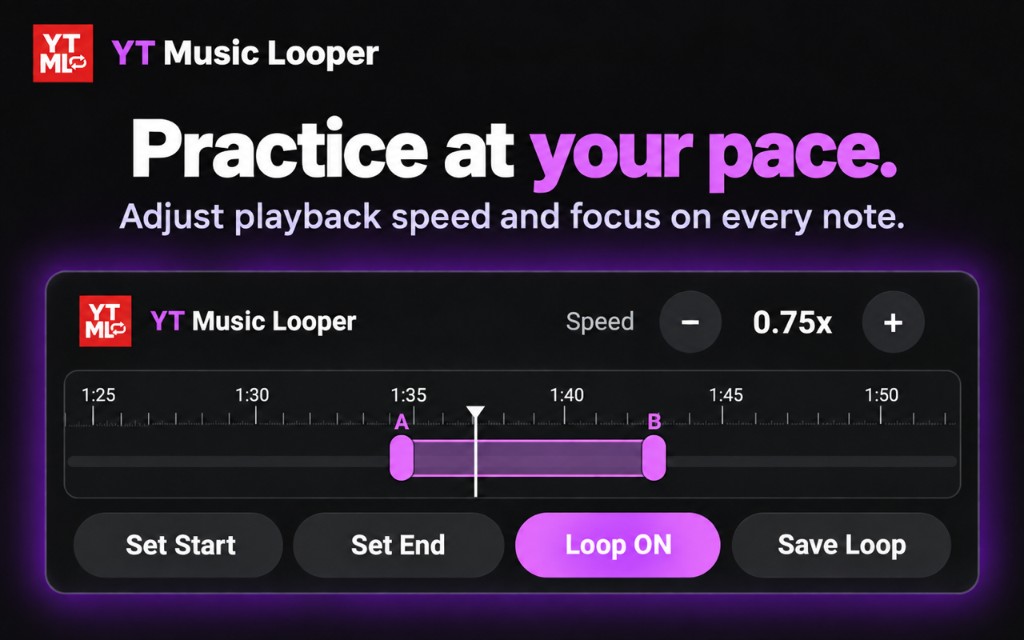
Practice at your pace.
Visual A/B looping and playback-speed controls, added directly to YouTube. Repeat difficult sections, study performances, and work through lessons without constantly dragging YouTube’s progress bar.

Stays on YouTube
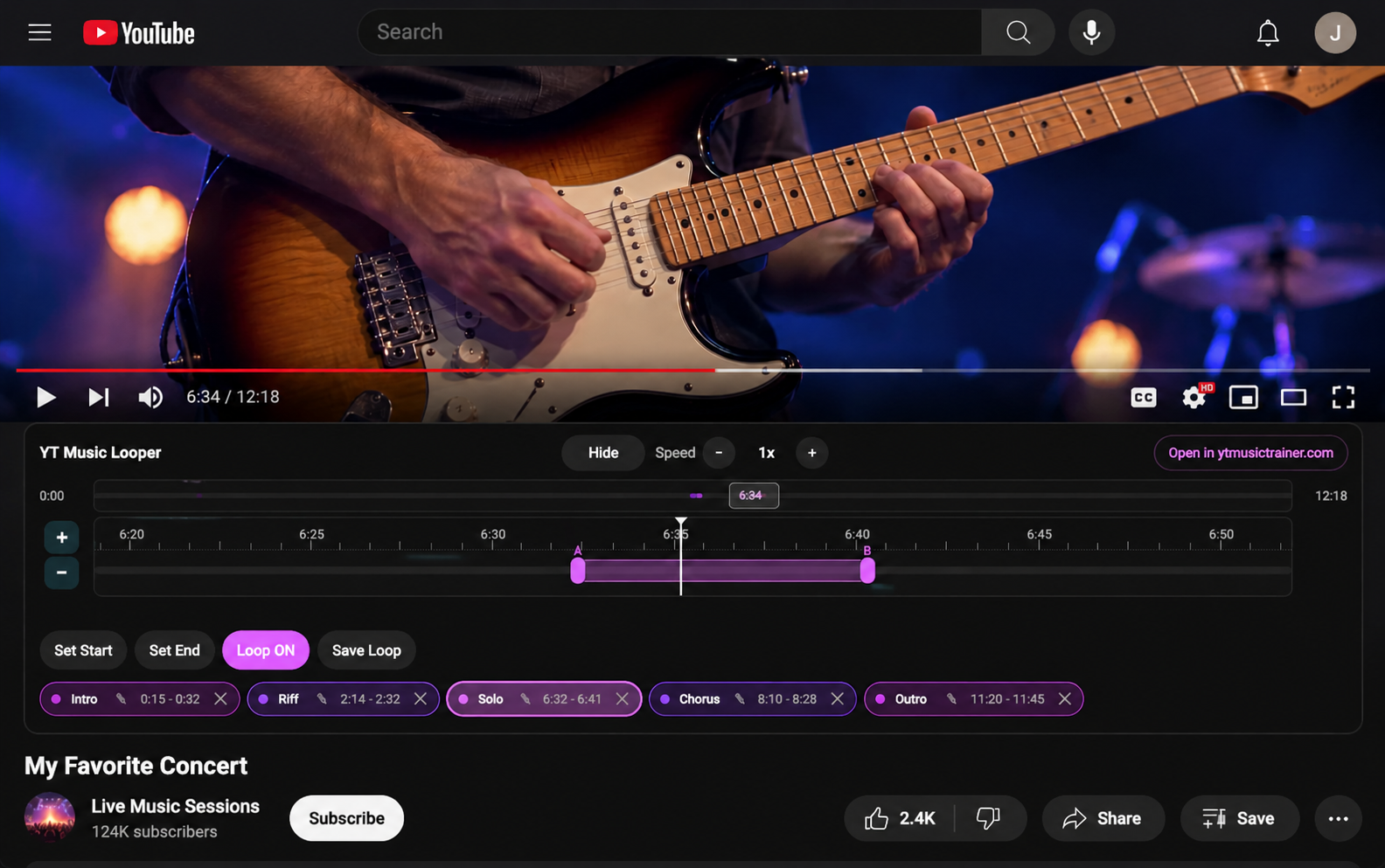
A practice panel below the video. Native controls stay visible.
Visual A/B looping
Drag start, end, or the whole loop. Zoom in on long videos.
Playback speed
Slow a passage down, then bring it back up to full speed.
No account needed
Basic looping works locally in your browser.
A lightweight companion
Practice tools on the video you are already watching
YT Music Looper adds a dedicated practice panel below the YouTube video. It does not cover the video or replace YouTube’s native controls.
When you want a broader practice environment — metronome, drone, drum machine, presets, and more — send the same video, playback position, and loops to YTMusicTrainer.com.
What you can do
Everything is visual and on-screen. You do not need a list of keyboard shortcuts to loop a phrase.
- Set a precise loop start point
- Set a precise loop end point
- Turn looping on or off
- Create and manage multiple loops for the current video
- Drag loop start and end points visually
- Move an entire loop earlier or later while preserving its length
- Zoom in on a small section of a long video
- Nudge loop boundaries forward or backward in small increments
- Adjust playback speed
- Save loop information locally in your browser
- Return to a video and continue with previously saved loops
- Open the video, position, and loops in YTMusicTrainer.com
Precise looping for long videos
Zoom into a 10-second phrase inside a two-hour lesson
A normal video progress bar makes it hard to select a short musical phrase inside a long lesson, concert, or instructional video.
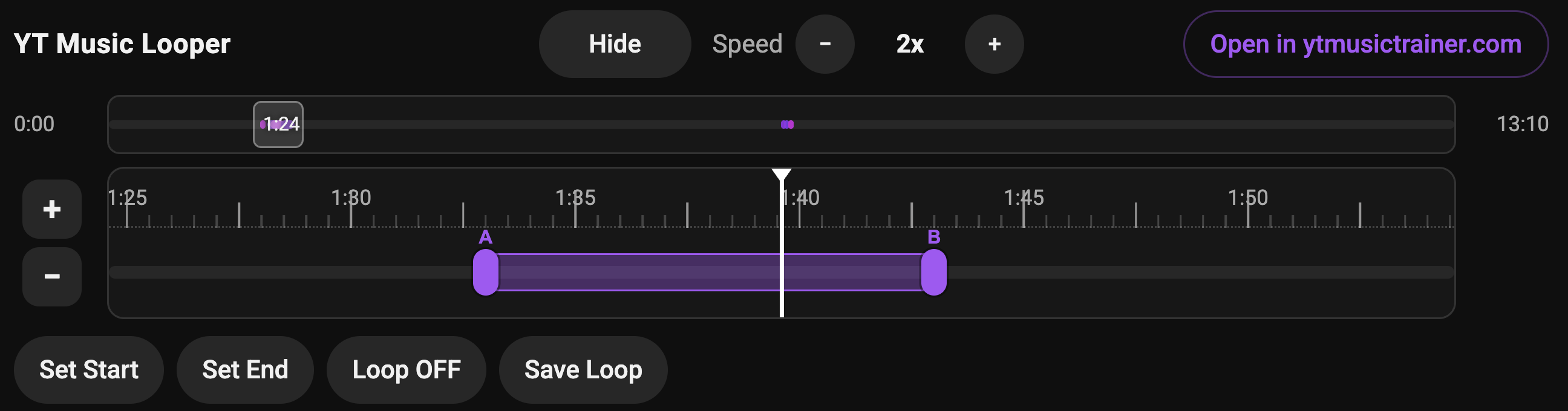
YT Music Looper includes both an overview timeline and a more detailed loop-editing timeline. The detail timeline can zoom into a small section so the loop stays large enough to adjust accurately.
- Drag the A handle to change the loop start
- Drag the B handle to change the loop end
- Drag the loop region to move it while keeping its duration
- Nudge boundaries in small increments when dragging is not precise enough
Playback speed control
Slow it down. Then bring it back up.
Convenient playback-speed controls let you slow difficult passages or gradually return them to full speed.
Especially useful for:
- Guitar practice
- Bass practice
- Piano practice
- Drum practice
- Transcription
- Ear training
- Learning solos
- Instructional videos
- Choreography and physical demos
- Short sections of lectures or tutorials
Multiple loops
Divide a song into practice sections
Create multiple loop regions within the same video. Split a longer lesson, solo, song, or performance into smaller sections and move between them quickly.
For example, a musician could save separate loops for:

Designed to work with YouTube, not replace it
YT Music Looper uses the video that is already playing on YouTube. The panel is placed below the video so the YouTube player remains visible and usable normally.
What it does
- Adds looping and speed controls on the current YouTube page
- Keeps YouTube’s player and controls visible
- Stores practice loops locally in Chrome when you save them
What it does not do
- It does not create a separate video player
- It does not download video or audio
- It does not replace YouTube’s player or hide its controls
- It does not block or skip advertisements
- It does not intercept YouTube media streams
Open in YTMusicTrainer
Continue the same session on YTMusicTrainer.com
When you want additional practice tools, use the Open in YTMusicTrainer button. The extension can send the current YouTube video ID, playback position, and your loop information so you can keep working with the same video.
YTMusicTrainer.com is the broader music-practice environment. The browser extension stays focused on quick looping and playback control directly on YouTube.
Go to YTMusicTrainer.com
A simple, visual workflow
YT Music Looper is intended to make repeated practice sections fast and visual, without scrubbing through the full YouTube timeline over and over.
- 1Open a YouTube video.
- 2Play to the beginning of the section you want to practice.
- 3Select Set Start.
- 4Continue playing to the end of the section.
- 5Select Set End.
- 6Turn Loop on.
- 7Drag or nudge the loop boundaries until the section is exactly right.
- 8Adjust playback speed if needed.
- 9Create additional loops for other parts of the video.
- 10Open the video in YTMusicTrainer.com if you want additional practice tools.
Local storage
YT Music Looper may store practice information locally in your browser so loop settings can be restored when you return to a video.
This may include:
- YouTube video ID
- Loop start and end positions
- Loop names or labels
- Playback-speed preference
This information is used to provide the extension’s practice functionality. Basic looping does not require an account.
Privacy
YT Music Looper is designed to use minimal permissions and collect as little information as possible.
- It operates on YouTube pages to control the video you are currently watching.
- Loop information may be stored locally in Chrome.
- Information is sent to YTMusicTrainer.com only when you explicitly choose Open in YTMusicTrainer.
- YT Music Looper does not sell personal information.
See also the YT Music Looper privacy policy and the YTMusicTrainer.com privacy policy. Need help? YT Music Looper Support.
Ready to loop the hard parts?
Add visual A/B looping and speed control to YouTube, then open the same session in YTMusicTrainer.com when you want more tools.
YT Music Looper is an independent extension associated with YTMusicTrainer.com and is not an official YouTube or Google product.
This service uses the YouTube API Services. By using our service, you agree to be bound by the YouTube Terms of Service. Video content is provided by YouTube™. YouTube and the YouTube logo are registered trademarks of Google LLC.